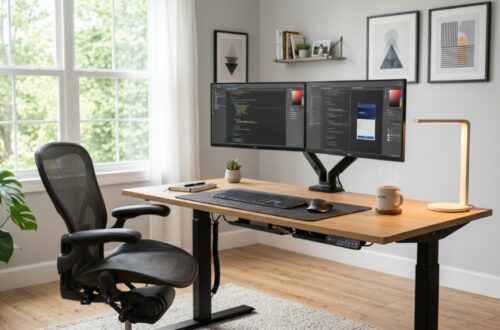

You bought the monitor, the ergonomic chair, and the noise-canceling headphones. But you still feel sluggish, distracted, and cramped by the end of the workday. The culprit might be sitting right under your elbows. For many remote workers, the difference between a focused, high-output day and a frustrating struggle boils down to one piece of furniture: the desk. This article walks you through exactly how to choose a productivity desk that transforms your space and supercharges your workflow.
What Makes a Desk a Productivity Desk vs. Just a Table?
A productivity desk is purpose-built to support sustained focus and efficient workflow. Unlike a standard table, it optimizes surface area, ergonomics, cable management, and accessory integration to minimize disruptions. A regular dining table sits too high for typing, offers no cable routing, and forces you into awkward postures. A productivity desk, by contrast, brings your screen to eye level, keeps your wrists straight, and hides the tangle of wires that breaks your mental flow. When your body is comfortable and your tools are within easy reach, your brain stays in the zone longer. A well-designed model also includes features like grommets, monitor arms, and adjustable depth that turn a passive surface into an active command center.
Why Does Desk Size Directly Impact Your Focus and Output?
Desk size determines how easily you can separate tasks, which directly reduces cognitive load. When you have enough depth and width, you can keep your primary monitor directly in front while placing reference materials, a tablet, or a notebook to the side without stacking. This clear physical separation mirrors how your brain organizes work. Research in environmental psychology shows that clutter increases cortisol levels and reduces working memory capacity. A larger, correctly proportioned surface prevents clutter from accumulating in your immediate sightline. For most people, a depth of at least 25 inches is critical to position a monitor far enough away for eye comfort. Width matters too: a 60-inch desk allows for a laptop, a secondary screen, and a task lamp without forcing you to work in a cramped corner.
Which Desk Shape Is Best for Deep Work and Multitasking?
An L-shaped desk is the most effective shape for deep work because it creates distinct zones for focused tasks and secondary activities. The primary workspace in front of you holds your main monitor and keyboard. The return side becomes a dedicated area for note-taking, a second screen, or a phone charger. This physical boundary trains your brain to switch contexts intentionally rather than haphazardly. Straight desks force you to rearrange items every time you shift tasks, which breaks concentration. A curved or rectangular L-shape also fits naturally into a corner, reclaiming dead space. If you frequently reference printed documents while typing or run video calls alongside data entry, the L-shape eliminates the need to constantly turn or stack items. A thoughtfully chosen corner productivity desk can double your effective surface area while occupying roughly the same floor footprint as a standard desk.
How Does Desk Height Affect Your Energy Levels Throughout the Day?
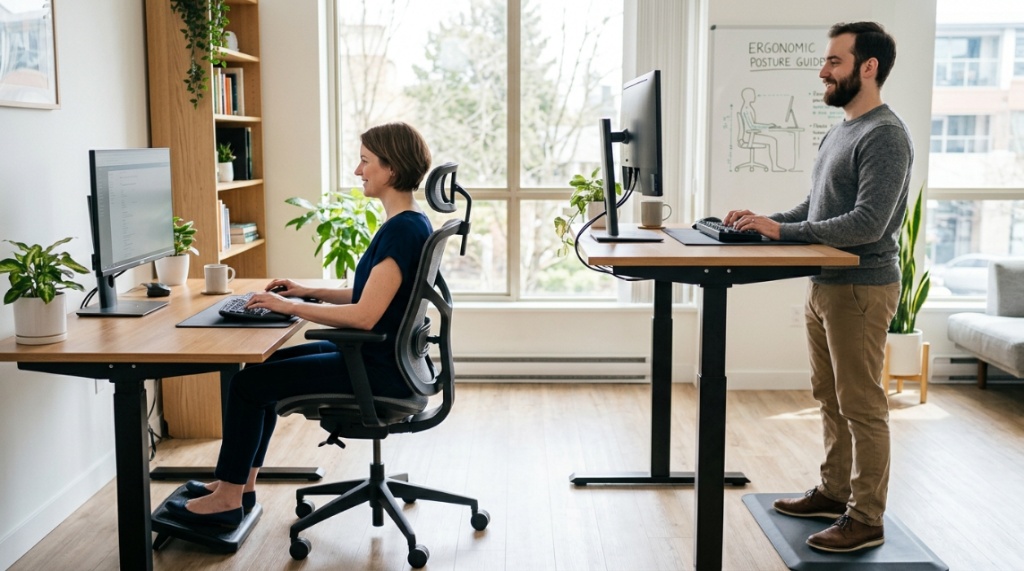
Non-adjustable desks force you to adapt to them, which leads to fatigue and poor circulation. Standard desk height is 29 inches, but this fits only a narrow range of body sizes. When your desk is too high, you hunch your shoulders, which strains your neck and reduces blood flow to your brain. When it is too low, you slouch forward, compressing your diaphragm and making it harder to breathe deeply. Over eight hours, these micro-adjustments drain your energy. A height-adjustable standing desk solves this by letting you shift between sitting and standing positions. Alternating posture every 30 to 45 minutes keeps your metabolism active, reduces spinal pressure, and maintains alertness. Even a fixed desk can be improved by pairing it with a keyboard tray that mounts underneath, effectively lowering your typing surface while keeping your monitor at eye level.
Can a Standing Desk Actually Boost Your Daily Output?
Yes, standing desks boost output by improving circulation and mental alertness, but only when used correctly. Studies published in the International Journal of Environmental Research and Public Health found that workers using sit-stand desks reported a 46% reduction in upper back and neck pain, which is a major productivity killer. Standing also increases heart rate slightly, which promotes better oxygen delivery to the brain. However, standing all day is just as bad as sitting all day. The benefit comes from the transition: standing during calls, brainstorming, or reading, then sitting during focused typing sessions. A good motorized model changes height smoothly, so you never lose momentum. If you choose a fixed-height standing desk, pair it with a tall stool so you can perch during seated tasks without fully lowering the surface.
How Should You Organize Your Desk Layout for Maximum Efficiency?
Organize your desk using the Zone Method, placing your most-used items within a 20-inch arc from your body. Your primary monitor should sit directly in front of you at arm’s length, with the top bezel at or slightly below eye level. Your keyboard and mouse should rest in the center, leaving enough space for your forearms to rest parallel to the floor. Place your secondary monitor to one side at a slight angle, ideally with the inner edges of both screens meeting. Keep your phone, water bottle, and notepad on your non-dominant side to avoid reaching across your body. Use vertical storage for items you use a few times a day, such as a headphone stand or a small drawer unit for cables and sticky notes. Never store items you use more than once per hour outside that inner arc, as every reach forces your spine to twist and your brain to reorient.
Essential Placement Guidelines
- Primary monitor: Center, arm’s length, top at eye level.
- Keyboard and mouse: Directly in front, wrists straight.
- Secondary screen: Dominant side, angled 15 degrees inward.
- Phone and water: Non-dominant side, within easy reach.
- Reference documents: Between keyboard and monitor base.
What Accessories Turn a Normal Desk Into a Productivity Hub?
The right accessories eliminate the three biggest productivity killers: poor posture, clutter, and eye strain. Without them, even the best desk falls short. Start with a monitor arm. It frees up desk space, allows you to adjust screen height and distance instantly, and cleans up cable routes. Next, add a cable management tray that mounts underneath the desk to hide surge protectors and excess wire length. A bright, adjustable task lamp with a color temperature range between 3000K and 5000K reduces eye fatigue during long hours. A quality mouse pad with a wrist rest prevents repetitive strain. Finally, a small desktop drawer organiser keeps pens, USB drives, and charging cables from rolling into your work zone. These accessories cost less than a new desk but often provide more immediate comfort improvements.
Which Materials and Finishes Support Long Hours of Work?
A desk’s material affects both durability and comfort during extended use. Solid wood or high-quality MDF with a laminate finish offers a smooth, consistent surface that resists scratches and doesn’t reflect glare. Avoid glass tops unless you use a large mouse pad, because glass causes hand fatigue from the cold surface and creates excessive glare from overhead lights. Particleboard desks often sag under heavy monitor arms after a year. For a productivity desk, look for a thickness of at least 1.5 inches and a weight capacity of at least 150 pounds. Matte finishes work best because they diffuse light rather than bouncing it into your eyes. If you choose a metal frame, ensure it has a crossbar to prevent wobble during typing, especially on carpeted floors.
How Much Should You Invest in a Productivity Desk for Real Results?
You can find a functional productivity desk starting around $250, but the sweet spot for long-term durability and ergonomic features is between $400 and $800. In this range, you typically get solid construction, a height-adjustable mechanism with dual motors, and a generous warranty. Spending less often means sacrificing stability or motor reliability, which leads to frustration and replacement costs within two years. Spending more than $1,200 usually adds luxury materials or brand markup without proportional ergonomic gain. Prioritize spending on the desk frame and surface size over decorative features. A simple, well-built desk with high adjustability outperforms an expensive designer desk that does not fit your body or workflow.
| Price Range | What You Typically Get | Best For |
|---|---|---|
| $150 – $300 | Fixed height, basic materials, limited weight capacity | Short-term or guest spaces |
| $400 – $800 | Height-adjustable, dual motors, sturdy frame, good warranty | Daily primary workstation |
| $900+ | Premium materials, advanced features, designer finishes | High-end aesthetics or commercial needs |
How Do You Measure Your Space Before Buying a Desk?
Measure your room with the desk against the longest wall or in a corner, leaving at least 36 inches of clearance behind your chair for movement. For an L-shaped desk, add the width of each leg together and confirm the corner angle matches the room layout. Account for additional depth if you plan to mount a monitor arm. Mark the footprint on the floor with painter’s tape and sit in your chair to test if you can comfortably reach all corners without stretching. Also measure doorways and hallway turns to ensure the desk can be delivered to your room. Many return headaches happen because a desk that fits perfectly on paper cannot physically make it up a narrow staircase.
What Common Desk Mistakes Kill Productivity Without You Noticing?
The most common mistake is choosing a desk that forces you into a fixed posture all day. A desk that is too shallow pushes your monitor too close, causing eye strain and forward head posture. A desk that is too narrow prevents you from spreading out reference material, so you constantly toggle between windows. The second mistake is ignoring cable management. Visible cables create visual noise that subtly distracts your brain even when you think you are ignoring them. The third mistake is buying a desk that wobbles. A slight shake during typing feels minor but causes micro-corrections in your typing rhythm, slowing you down and increasing errors. Always check desk stability test videos or reviews before purchasing, especially for height-adjustable models on casters.
Conclusion
Your desk is not just a place to set your laptop. It is the physical foundation of your daily workflow. Choosing the right size, shape, height adjustability, and material directly influences how clearly you think, how long you can sustain focus, and how much strain you put on your body. A truly productive home office starts with a surface that fits you, not the other way around. Take your measurements, evaluate your daily tasks, and invest in a desk that supports the way you actually work. Your future self will thank you with sharper focus, more energy, and better output. Start upgrading your workspace today by selecting a desk that puts your health and efficiency first.
Frequently Asked Questions
What is the best desk size for productivity?
The best size is at least 60 inches wide and 25 inches deep. This provides enough room for a primary monitor, a secondary screen, a keyboard, and reference materials without overcrowding the surface.
Is an L-shaped desk better than a straight desk?
Yes, for multitaskers and deep workers. An L-shaped desk creates dedicated zones for different activities, reducing context switching and keeping primary work areas clutter-free.
Can a standing desk really improve focus?
Yes, when used intermittently. Alternating between sitting and standing every 30 to 45 minutes improves blood circulation, reduces fatigue, and maintains mental alertness throughout the day.
How high should my desk be for typing?
Your desk should allow your elbows to rest at a 90-degree angle while typing, with your forearms parallel to the floor. For standard height desks, a keyboard tray underneath often achieves the correct fit.
What material is best for a productive desk?
High-quality MDF with a laminate finish or solid wood offers durability, scratch resistance, and a matte surface that reduces glare. Avoid glass and cheap particleboard for long-term use.
Do monitor arms really help productivity?
Yes, monitor arms free up desk space, enable perfect screen positioning, and drastically reduce neck strain. This direct ergonomic benefit allows you to work longer without discomfort.
How much should I spend on a productivity desk?
For a reliable, height-adjustable desk, budget between $400 and $800. This range provides dual motors, sturdy frames, and solid warranties without paying for luxury branding.